A timer is not a billing workflow: what time trackers leave out
A stand-alone time tracker answers how long. Freelancers also need to show what, for whom and approved by whom. Where Billnox goes further.
By Billnox · · 1 min read
A timer answers one question: how long. At invoice time, a client asks different ones. What did you do? Was it what I asked for? Why is the total this number? A time tracker that stops at the timer leaves you to answer all of that yourself.
Four gaps a timer on its own leaves
- Reporting. Turning raw entries into something a client can read in a minute.
- Approval. A way for the client to see the work and agree to it before it is billed.
- Invoicing. Turning approved time into an invoice without retyping any of it.
- Retainers. A fixed monthly fee still needs hours on record behind it.
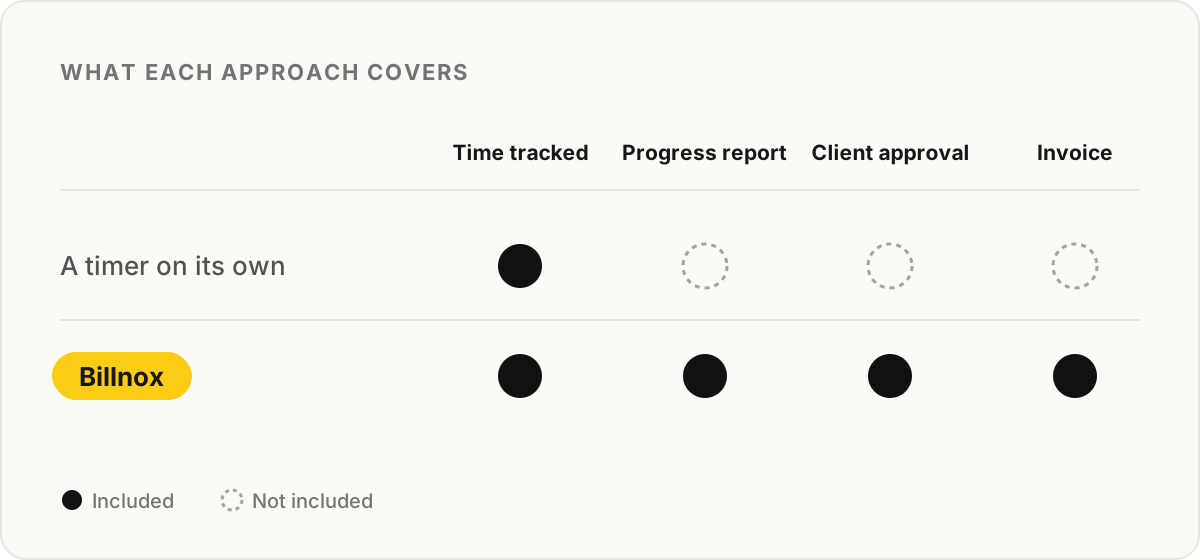
How Billnox closes each gap
Reporting: progress reports are generated from the entries you tracked, and can be shared as a link or downloaded as a PDF.
Approval: the client workspace lets a client review entries and approve them. Approvals sit on the entries themselves, so the invoice only contains work the client has seen.
Invoicing: invoices are created from entries and can carry payment details such as a bank QR code or Wise details. Freelance invoicing goes through how that works.
Retainers: fixed monthly clients are billed a flat amount on a monthly or fortnightly cycle, and the tracked hours stay on record behind it. See solo freelancer billing.
What Billnox is not
Billnox is not accounting software. It does not file your taxes or keep your books, and it is in open beta, so some things you might expect from older tools are still being built. If you already have an accounting system, treat Billnox as the layer before it: the record of the work and the invoice, not the ledger.